
Android 8.0 Oreo, thoroughly reviewed
- Android 8.0 Oreo is here! Click through for a gallery of top features.Google
- Project Treble finally separates the OS from the hardware, which has big implications for updates, third-party ROMs, and security.
- Notifications get sorted into buckets now, with a new, tiny notification section at the bottom called "by the way."
- Media notifications automatically get colored based on the album art.
- Pull a notification to the side slightly, and you can snooze it.
- Google Play Protect isn't really new, but it gives reassuring branding to Android's security features.
- Every emoji has been redesigned in Android 8.0, and you get 69 new emojis!
- Settings has a new color scheme, new icons, and has been totally rearranged.
- A new Autofill framework can automatically fill in forms for you, and gives password managers a supported API for Android.
Android 8.0 Oreo is the 26th version of the world's most popular operating system. This year, Google's mobile-and-everything-else OS hit two billion monthly active users—and that's just counting phones and tablets. What can all those users expect from the new version? In an interview with Ars earlier this year, Android's VP of engineering Dave Burke said that the 8.0 release would be about "foundation and fundamentals." His team was guided by a single question: "What are we doing to Android to make sure Android is in a great place in the next 5 to 10 years?"
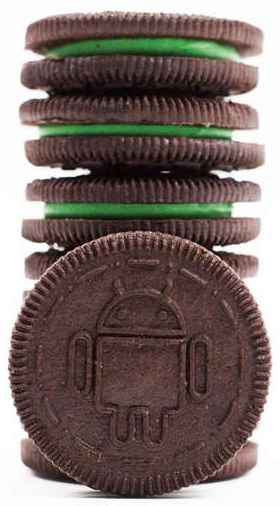
Like its partnership with Nestle for Android 4.4 "KitKat," Google is taking its alphabetical snack-themed codenames to the extreme with 8.0, and partnering with an actual snack company. This time Nabisco is sharing the "Oreo" brand with Google (We've yet to hear about any kind of monetary arrangement for this sort of thing). Google's Eclipse-themed launch party was complete with custom Oreo cookies featuring an Android robot design and green filling.
Two billion users is a huge number, but with Android 8.0, Google shows that it still isn't satisfied. A new initiative called "Android Go" targets the developing world, where cheap devices and limited access to data and power require taking a different look at how some parts of Android function.
Oreo will also serve as the base for three new Android form factors. It will be built into cars as "Android Automotive," where Google works with car OEMs to integrate Android. Android 8.0 will also be the base OS for "Android Things," an "Internet of things" (IoT) version of the OS designed to easily manage on embedded devices. Finally, Google's virtual reality "Daydream" group will also launch a new form factor with Oreo—standalone VR headsets.
So, coming soon to your phone, your tablet, your watch, your TV, your car, your "things," and your VR headset—it's Android 8.0 Oreo. Let's dive in.
Table of Contents
- Project Treble—Finally, real progress on the fragmentation problem
- HAL versioning and deprecation
- Working with SoC vendors
- A ROM revolution
- Isolating the media stack
- Android's biggest re-architecture, ever
- Notifications—Android's best feature gets better
- The new layout—and its awesome “By the Way” section
- The new colors and media notifications
- Snoozing notifications
- Notification Channels: Great for apps that have it, terrible for apps that don't
- Icon badges and shortcuts
- The new ambient notification display
- The Great Background Processing Lockdown
- Mandatory JobScheduler
- RIP Implicit Broadcasts
- No more wakelocks, no silent background services
- (Somewhat) gracefully declining on older OSes
- Limiting scans for location and Wi-Fi
- A real API for floating apps
- Security
- Google Play Protect—Google says "please don't install antivirus apps"
- Sideloading changes
- Security grab bag
- Emoji: New glyphs and an all-new design
- EmojiCompat and Downloadable fonts—updating emojis without a system update
- System UI improvements
- Adaptive icons—Shape shifting, animated icons
- A new widget picker
- Picture-in-Picture for phones and tablets
- Smart text selection and TensorFlow Lite
- AutoFill
- Settings—A new theme, a new layout
- Streaming OS Updates—never fail an update due to storage space again
- Rescue Party
- Android Go—Scaling Android for the next billion users
- The OS in "Go" mode
- Google Play Services gets chopped up
- Apps get special "Go" versions and features
- Color management
- Physics-based animation and the new Easter Egg
- The new "SDCardFS" file system wrapper
- Grab Bag
- "Foundational" improvements address updates, security, speed, and battery life
- The Good
- The Bad
- The Ugly
Listing image by Google
https://arstechnica.com/gadgets/2017/09/android-8-0-oreo-thoroughly-reviewed/